
unRAID NAS Server Pro 6.9.2 学习版

7,742 views次阅读
7 条评论

unRAID NAS Server Pro 6.9.2 学习版

--- 温馨提示 ---

unRAID NAS Server Pro 6.9.2 学习版

蓝冰 领主报道 bzroot 文件 体积 700M ,有点凶哦!~~ 正常的是 142-145M之间 !!!

下载地址:(解压密码:hopol)

https://mega.nz/file/JBInyKxa#GwJ5CLfzBL47B4-zAyDSjKcZssAIxROd2VIiMqi8nsk


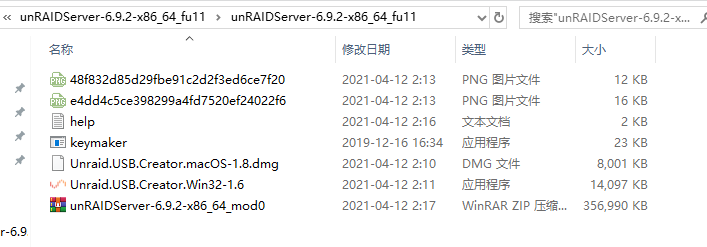
解压后文件截图:
unRAID NAS Server Pro 6.9.2 学习版

unRAID NAS Server Pro 6.9.2 学习版

相关:


更新日志:

## Version 6.9.2 2021-04-07

### Base distro:

- docker: version 20.10.5
- fuse3: version 3.10.2
- nginx: version 1.19.9
- samba: verson 4.12.14 (CVE-2020-27840 CVE-2020-27840)

### Linux kernel:

- version 5.10.28
- include all CONFIG_NF_* modules
- oot: realtek r8125: version 9.005.01

### Management:

- emhttpd: detect out-of-band device spin-up
- shfs: add 'copy_file_range()' support
- shfs: fix 'mknod' creating a fifo
- webgui: login: implement max 3 failed login attempts per 15 mimute interval
- webgui: Fix links on notifications not being present if in summary display
- webgui: Plugins: Move incompatible plugins to ../plugins-error
- webgui: Fix missing CSRF when deleting pool
- webgui: Fix .sweet-alert color
- webgui: Translations adjustments
- webgui: Diagnostics: Prevent double clicks on download button
- webgui: Fix default usage thresholds not sending notification
- webgui: Fix CSS span.select background-color
- webgui: Make diagnostics messages left aligned
- webgui: Fixed javascript error in DeviceInfo.page preventing settings to be saved
- webgui: Update DeviceInfo.page
- webgui: Prevent autofilling of passwords on containers
- webgui: Docker: Do not allow CPU pinning if no template present
- webgui: Fix .sweet-alert .sa-icon color, * in the CSS


正文完
 0
HopoL
版权声明:本站原创文章,由 HopoL 于2021-04-13发表,共计1252字。
转载说明:除特殊说明外本站文章皆由CC-4.0协议发布,转载请注明出处。
评论(7 条评论)
masterwishx 评论达人 LV.1
2021-04-14 23:03:34 回复

等待快乐版

 Windows  Chrome  以色列
rei 评论达人 LV.1
2021-04-20 19:54:49 回复

为啥突然这么大? 还有这个可以直接替换6.7.x来启动吗?

 Windows  Edge  中国江苏省苏州市电信
番茄 评论达人 LV.1
2021-05-10 18:47:14 回复

bzroot 文件 体积 700M 应该是没有压缩的关系?

 Windows  Chrome  中国江苏省苏州市电信
番薯 评论达人 LV.1
2021-06-04 11:40:39 回复

什么时候出开心版?[f=xiaoku]

 Windows  Chrome  中国香港
    hopol 博主
    2021-06-14 21:48:24 回复

    @番薯 能用就行,一切随缘!~ [f=tiaopi]

     Windows  Chrome
亮亮 评论达人 LV.1
2021-10-16 17:27:44 回复

bzroot文件大小异常吗,就怕是预埋了挖矿的程序。

 Windows  Chrome  美国微软
    番茄 评论达人 LV.1
    2021-10-21 12:58:00 回复

    @亮亮 700MB 用了大半年了 好像没问题 怕的话有一个正常大小的版本精英版百度bilibili上的 : unraid6.9.2精英版 百度第一条就是

     Windows  Chrome  中国江苏省苏州市电信

HopoL's Blog

文章搜索
最新评论
Metaldololity Metaldololity Whoa, that's really simple. You just save my time a lot. Thankyou!
HopoL HopoL Since you’ve got the backup, it’s actually pretty simple. Just restore the backup files to your new flash drive, then head over to the /config directory and edit the go file. Look for export UNRAID_GUID=xxxxxxxxxxxxxx and swap it with your new drive's GUID. That should do the trick!
Metaldololity Metaldololity Really apreciate for your fast respond, mate. I actually have the backup of the flashdrive (from regular unraid backup). The problem is, when i search on youtube tutorial about changing the failed flashdrive, the process need some sort of confirmation with an account in unraid (blacklist the old one -> whitelist the new one). Since i have a cracked unraid, i don't know how to register my new flashdrive as the correct one (and the system not asking me for the old failed flashdrive). Thanks in advance
HopoL HopoL Man, that's a tough spot to be in. Regularly backing up your /boot folder is super important for exactly this reason. If you don't have a backup and your flash drive is completely fried, your best bet is to Google some specific recovery guides or check the Unraid forums. There are ways to rebuild your config by identifying your parity and data drives, but it can be a bit of a process. Hope you can get it sorted!
Metaldololity Metaldololity Hi! Huge thanks for the update on 7.2.0. I have question here, my flashdrive corrupted. how do i install it on the new flashdrive without losing all my configuration?