
Air Explorer Pro——网盘云盘聚合管理工具,支持绝大多数云服务器

4,689 views次阅读
没有评论

提醒:本文最后更新于2025-09-15 13:26,文中所关联的信息可能已发生改变,请知悉!
Air Explorer Pro——网盘云盘聚合管理工具,支持绝大多数云服务器

AirExplorer是一款强大的云盘处理工具,支持多个云盘聚合管理,还支持多云盘之间的数据迁移等,Air Explorer还可以加密您的文件,从同一服务器设置多个帐户,支持多个云服务之间文件的粘贴复制等。


目前支持的云服务:

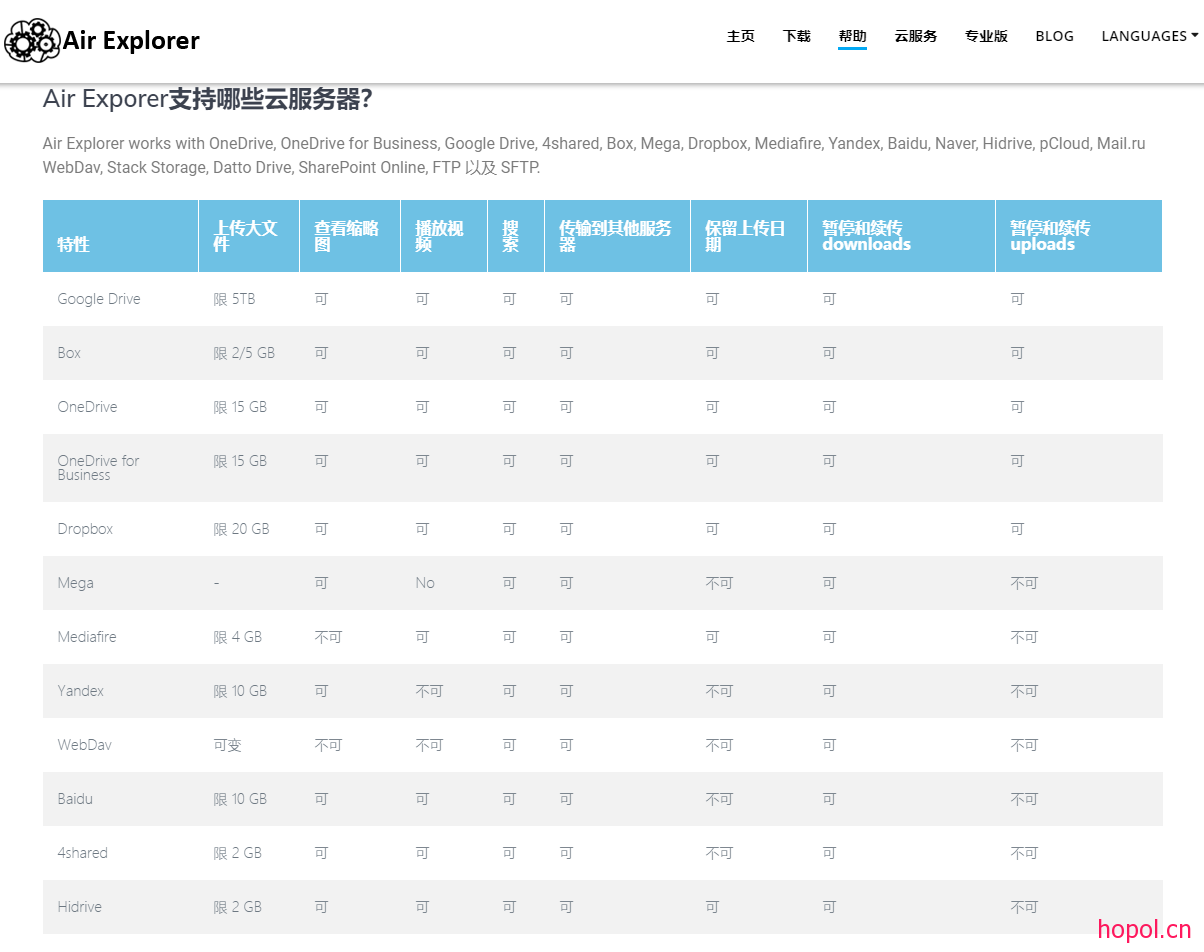
Air Explorer可与OneDrive,OneDrive for Business,Google Drive,Amazon Cloud Drive,4shared,Box,Mega,Dropbox,Mediafire,Yandex,百度,Naver,Hidrive,pCloud,Mail.ru WebDav,堆栈存储,Datto Drive,FTP和SFTP


功能:

在云中直接管理您的文件

可选地,Air Explorer可以在将文件上传到云时对文件进行加密

从同一台服务器设置多个帐户

您可以在任何云或计算机之间同步文件夹

通过加入所有云来增加存储空间

在云服务器之间复制/粘贴

暂停并继续上传和下载

Air Exlorer可以共享文件

在所有云中集中搜索文件

易于使用的云文件资源管理器

适用于Windows的应用程序

图片的缩略图视图

在计算机和云之间拖放文件

插件系统添加云服务器

独立开发插件


下载地址:

Air Explorer Pro v2.8.1 绿色版

https://hopol.lanzoui.com/i938qgh


AirExplorer Pro 2.9.0 安装版

https://hopol.lanzoui.com/iOy90nari9c


Air Explorer专业版v4.0.1便携破解版

https://hopol.lanzouh.com/iVkUN02al1yj


AirExplorer Pro v5.4.3 便携修改版

https://hopol.lanzouo.com/imHoI2xxf7gh


Air Cluster Pro 1.3 Portable.zip

https://hopol.lanzouo.com/iJrUf3681x1i

注意

登录百度网盘无法读取文件:将文件移动到AirExplorer文件夹里

也就是 我的应用数据 目录里,找到 AirExplorer文件夹。

如果文件太多看不清,可以直接搜索 apps 就能看到了。

正文完
 0
HopoL
版权声明:本站原创文章,由 HopoL 于2020-02-06发表,共计902字。
转载说明:除特殊说明外本站文章皆由CC-4.0协议发布,转载请注明出处。
评论(没有评论)

HopoL's Blog

文章搜索
最新评论
MickeyDee MickeyDee Thanks for the reply, according to Unraid Dev team, it may happen this year.
Metaldololity Metaldololity Whoa, that's really simple. You just save my time a lot. Thankyou!
HopoL HopoL Since you’ve got the backup, it’s actually pretty simple. Just restore the backup files to your new flash drive, then head over to the /config directory and edit the go file. Look for export UNRAID_GUID=xxxxxxxxxxxxxx and swap it with your new drive's GUID. That should do the trick!
Metaldololity Metaldololity Really apreciate for your fast respond, mate. I actually have the backup of the flashdrive (from regular unraid backup). The problem is, when i search on youtube tutorial about changing the failed flashdrive, the process need some sort of confirmation with an account in unraid (blacklist the old one -> whitelist the new one). Since i have a cracked unraid, i don't know how to register my new flashdrive as the correct one (and the system not asking me for the old failed flashdrive). Thanks in advance
HopoL HopoL Man, that's a tough spot to be in. Regularly backing up your /boot folder is super important for exactly this reason. If you don't have a backup and your flash drive is completely fried, your best bet is to Google some specific recovery guides or check the Unraid forums. There are ways to rebuild your config by identifying your parity and data drives, but it can be a bit of a process. Hope you can get it sorted!