win10 彻底关闭windows Defender

2,663 views次阅读
没有评论

提醒:本文最后更新于2025-06-19 10:40,文中所关联的信息可能已发生改变,请知悉!

windows Defender是win10自带的保护电脑的工具,个人不习惯使用,烦人扰民直接关闭。


进入注册表:


HKEY_LOCAL_MACHINESYSTEMCurrentControlSetServicesSecurityHealthService


右侧找到 Start ,将原来的 2 改成 4  就能彻底关闭 Windows Defender。
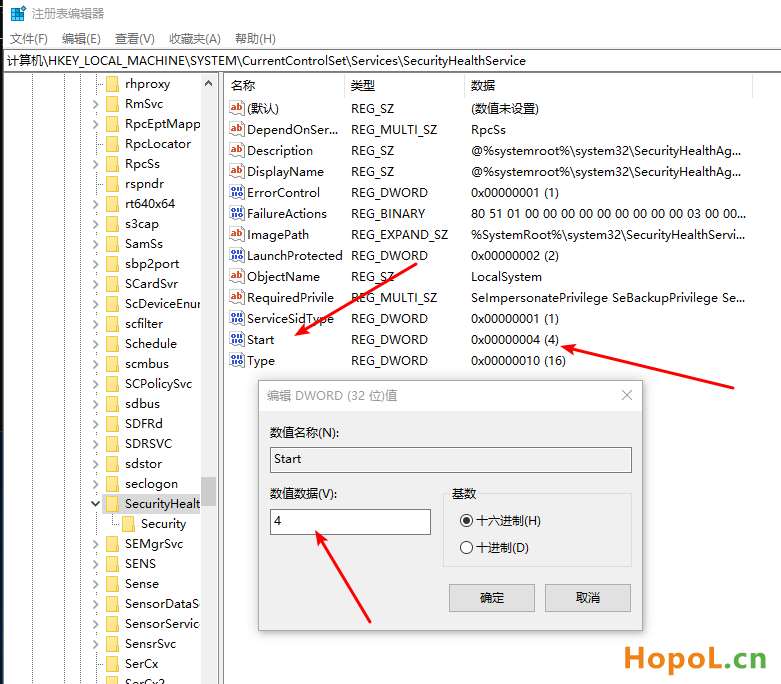
 

win10 彻底关闭windows Defender


-End-

正文完
 0
HopoL
版权声明:本站原创文章,由 HopoL 于2018-05-06发表,共计176字。
转载说明:除特殊说明外本站文章皆由CC-4.0协议发布,转载请注明出处。
评论(没有评论)

HopoL's Blog

文章搜索
最新评论
阿龙 阿龙 谢谢大佬分享
MickeyDee MickeyDee Cancell that, figured it out and it works, Much appriciated .
MickeyDee MickeyDee Hi Thanks for sharing, please clarify, do you mean Rename the folder "unraider-7.2.0" to unraider and copy it to the config . Thanks
lzdwudi lzdwudi 我也想试试 但我目前的版本是6.12.13 我不敢做大的动作
wice222 wice222 archive is demaged
tstUser01 tstUser01 Thanks for sharing!
saisu saisu how to install from scratch for noobs like me please :D What is GUID ??
Adrian Adrian How update works? Should we rename unraider file, do the update and rename back? from 7.2.0 to 7.2.1
步兵 步兵 哈喽 想请问一下文件是从老毛子网站下载的吗 因为怕有挖矿的后门 所以想了解确认一下 感谢
hpapagaj hpapagaj Thank you.
