
CLaunch 4.04 汉化版快捷启动管理小工具

3,159 views次阅读
没有评论

提醒:本文最后更新于2025-06-19 10:40,文中所关联的信息可能已发生改变,请知悉!

软件名称:CLaunch
软件版本:4.04
官方网站:https://hp.vector.co.jp/authors/VA018351/claunch.html
软件汉化:飞扬时空 http://blog.sina.com.cn/s/blog_89a729a40102wjwp.html
更新日期:2022年12月25日

20230525

飞扬时空的网盘,里面有她所有作品的链接

http://iyoung.ysepan.com/

顺便更新一下

CLaunch_Ver.4.02_Chs

CLaunch_Ver.4.04_Chs


CLaunch 英文官网镜像:

  • http://pyonkichi.g1.xrea.com/en/


CLaunch 日文皮肤网站:

  • http://xxlost.com/download/skin/
  • http://skin.squares.net/cgi-bin/ecobbs1/ecobbs.cgi?page=1


【软件说明】

CLaunch 是一款快捷启动管理小工具,具有轻便小巧、快捷方便、功能丰富的优点,支持 Windows 98/ ME/2000/XP/Vista/7操作系统,同时提供了32位及64位版本。
通过 CLaunch,用户可以方便地对系统功能、快捷方式、文件路径等资源进行集中管理和调用。调用的方式也异常丰富,如点击图标、鼠标动作、键盘热键等。
CLaunch 的最大特点是提供了非常丰富的选项设置,允许用户根据自己的喜好对软件界面、操作方式等进行定制。另外,软件资源占用很低,支持皮肤及插件。
 

【汉化说明】

CLaunch 软件的本地化借由语言文件实现。而本版本中文语言文件参照官方英文语模板精心翻译制作,保留软件所有功能。
 

【更新历史】

2020.07.21  汉化更新,软件版本:4.02
2020.07.19  汉化更新,软件版本:4.01
2019.04.22  汉化更新,软件版本:3.29
2018.07.23  修正汉化过程存在的问题(软件版本:3.28)
2018.02.27  汉化更新,软件版本:3.28
2016.10.11  软件版本更新为3.27版
2015.12.15  修正3.26版本汉化存在的问题,新增并更新部分皮肤
2015.11.26  软件版本更新为3.26版
2014.04.16  修正3.24版本汉化中存在的部分问题
2014.02.19  软件版本更新为3.24版
2012.12.14  修正3.22版本汉化中存在的部分问题
2012.08.05  软件版本更新为3.22版
2012.02.24  软件版本更新为3.21 版,添加皮肤资源
2012.02.18  修正切换至中文后选项菜单显示不完整的问题
2012.02.14  本版本首次发布于顶点工具箱2.1.1,版本:3.20
 

【下载地址】

https://pan.lanzou.com/b155684/ 密码:98to
包含以下:
CLaunch_3.27_Chs_X86_V2.7z
CLaunch_3.27_Chs_X64_V2.7z
CLaunch_Skins.7z
CLaunch_3.29_X86.rar
CLaunch_3.29_X64.rar
CLaunch_Ver.4.02_Chs.zip

【软件截图】
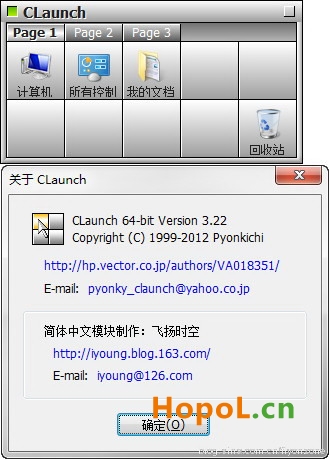
CLaunch 4.04 汉化版快捷启动管理小工具

【特别声明】

1、本软件相关资源收集自互联网,版权归其开发厂商及作者所有。
2、本软件仅限于个人学习交流,请勿用于任何形式商业用途。
3、您必须自行承担使用过程所有可能引起的后果及损失。
4、使用过程中若有意见或建议,请及时反馈和指正。
正文完
 0
HopoL
版权声明:本站原创文章,由 HopoL 于2018-01-21发表,共计1439字。
转载说明:除特殊说明外本站文章皆由CC-4.0协议发布,转载请注明出处。
评论(没有评论)

HopoL's Blog

文章搜索
最新评论
HopoL HopoL Man, that's a tough spot to be in. Regularly backing up your /boot folder is super important for exactly this reason. If you don't have a backup and your flash drive is completely fried, your best bet is to Google some specific recovery guides or check the Unraid forums. There are ways to rebuild your config by identifying your parity and data drives, but it can be a bit of a process. Hope you can get it sorted!
Metaldololity Metaldololity Hi! Huge thanks for the update on 7.2.0. I have question here, my flashdrive corrupted. how do i install it on the new flashdrive without losing all my configuration?
acettu acettu well tnx is possible to update it?
HopoL HopoL Ciao!‌ Per trovare il tuo GUID, ti consiglio di cercare su Google qualcosa come "unRAID GUID tutorial" o "come ottenere il Flash GUID di unRAID". Ci sono tante guide dettagliate che ti spiegano passo passo come fare. Poiché il metodo esatto può variare a seconda del tuo setup, è meglio seguire una guida affidabile piuttosto che provare a spiegartelo qui. Buona fortuna!
HopoL HopoL Hey there! To find your GUID, I'd recommend searching for "unRAID GUID tutorial" or "how to get unRAID Flash GUID" on Google. There are plenty of detailed guides out there that walk you through the process step by step. Since the exact method can vary depending on your setup, it's best to follow a trusted tutorial rather than me trying to explain it here. Good luck!
acettu acettu tnx can you explain where i get my GUID?
HopoL HopoL full
19731973 19731973 so is this the full os or just a update file
HopoL HopoL Yeah, back in the older Unraid versions, some folks managed to get it booting from drives like SATA or NVMe by compiling the software themselves. But that method never got updated or maintained afterward, so it might not work with the current setups. Hope that helps!
MickeyDee MickeyDee Slightly off topic but anyone managed to get Unraid to boot off anything other than USB, like sata or nvme? If wrong place please delete and advise